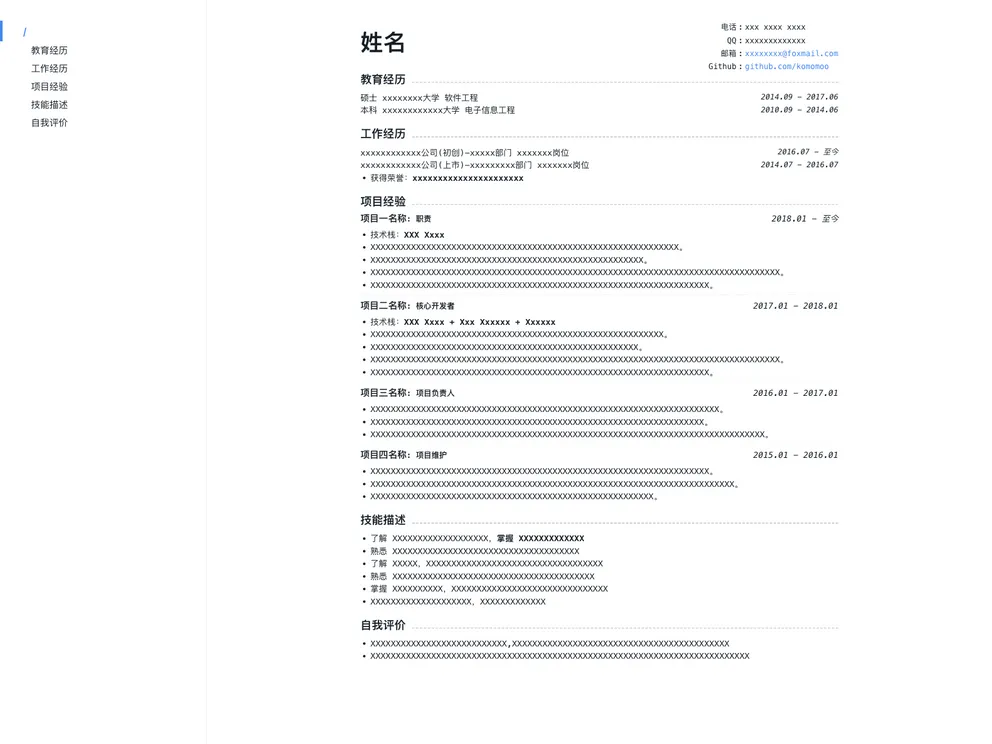
Vuepress Theme Resume screenshot

Vuepress Theme Resume

Author Avatar Theme by Komomoo
Updated: 8 Aug 2025
476 Stars

书写简洁优雅的前端程序员 markdown 简历,由 vuepress 驱动

Categories

Overview:

Markdown is a popular format for writing resumes, but it has some pain points. The built-in markdown preview in text editors is not aesthetically pleasing, and using paid apps like Bear still has limitations, such as not being able to modify font parameters when exporting to PDF. After trying various markdown software on Mac, none of them were satisfactory. This led to the development of a new markdown theme that addresses these issues.

Features:

  • Aesthetic design: The theme provides a visually pleasing layout for markdown resumes.
  • Customizable font parameters: Users can modify the font size and other parameters to suit their needs.
  • Easy installation: The theme can be cloned or downloaded from a git repository and run on the desired environment.

Installation:

  1. Clone or download the project.
  2. Navigate to the project directory.
  3. If yarn/npm is not installed in the environment, install yarn first.
  4. Run yarn dev to start the project.
  5. Open the provided URL in a browser.
  6. Modify the example/README.md file and save to see automatic hot updates.
  7. To export as PDF, right-click on the Chrome page, select “Print”, and then choose “Save as PDF”. Make sure to uncheck the header and footer options to avoid adding unnecessary content.
  8. To control the PDF to only have one page, follow one of the two methods:
    • Method 1: Modify the “$fontSize” value in the .vuepress/styles/palette.styl file.
    • Method 2: In Chrome print settings, adjust the zoom level.
  9. For collaboration, users can contribute their ideas through pull requests.

Summary:

This article introduces the pain points with existing markdown solutions for writing resumes, such as lack of aesthetics and limited customization options. It then presents a new markdown theme that addresses these issues by providing an elegant design, customizable font parameters, and easy installation process. The installation guide explains how to clone or download the theme, modify the content, and export the resume as a PDF with desired settings. The article concludes by inviting users to contribute their ideas and expressing gratitude for any helpful feedback.
